A2A Serve
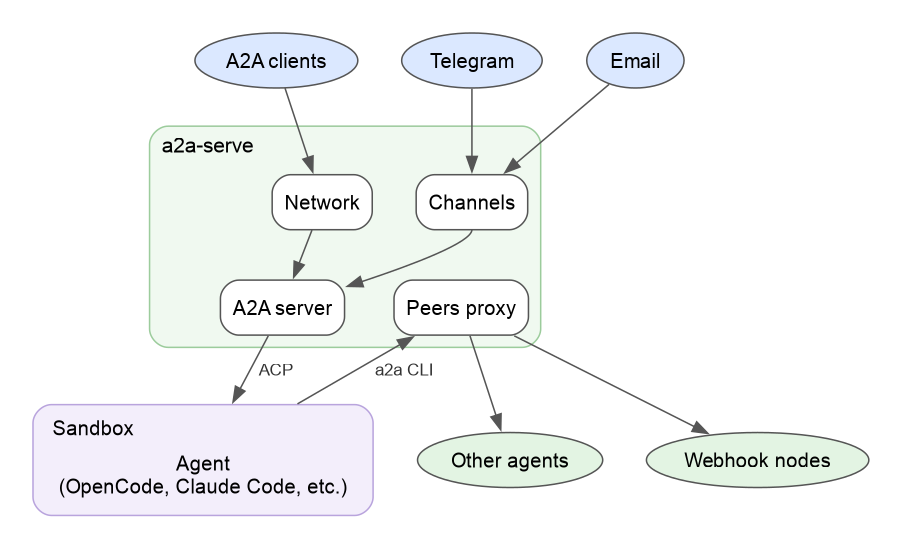
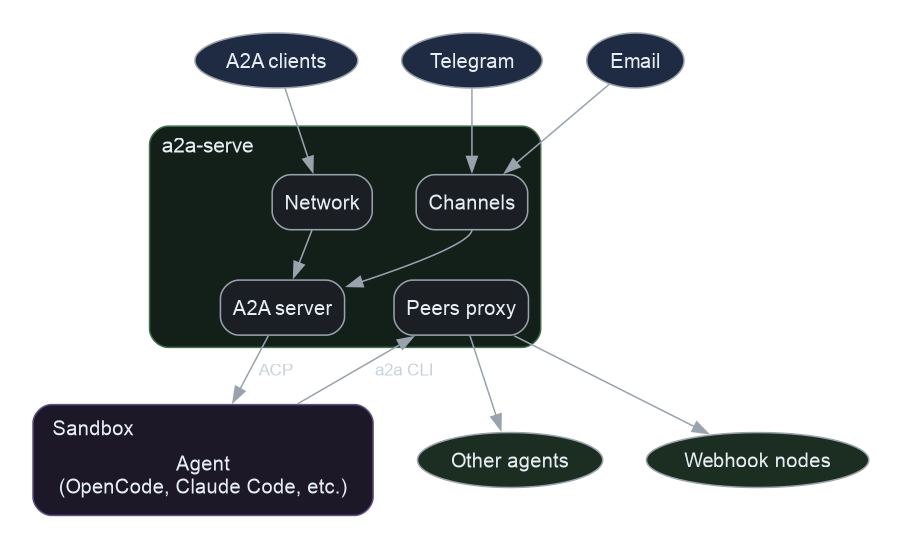
Visit Getting Started to see how a single command turns the coding agent on your machine into a sandboxed A2A agent that popular messengers and other agents can call.
Warning
A2A Serve is pre-1.0. Commands, flags and config.yaml keys may change; stored state always migrates forward. Read the security page and the known limitations before you expose an agent to other people.
Install
brew install a2aproject/a2a-cli/a2a-serve    # macOS and Linux
a2a-serve doctor --fix                       # set up the a2a CLI and check Docker
Without Homebrew, use the install script:
curl -fsSL https://raw.githubusercontent.com/a2aproject/a2a-serve/main/install.sh | sh
Both install a2a-serve and the a2a CLI, which you use to talk to agents.
Features
- Any ACP agent: opencode, Claude Code, or your own with
a2a-serve start acp --command. - Sandbox and approvals: the agent runs in Docker, and its edits and commands wait for your approval.
- Reachable anywhere: your tailnet, an Agent Mesh relay, a public URL, Telegram, Discord or email, with access by one-time pairing codes.
- Agents calling agents: the agent delegates to other agents through the server, which keeps their tokens outside the sandbox.
User Guide
| Supported Agents | The supported agents, images and platforms |
| Running | Start, stop, restart and check on an agent |
| Config | Change settings |
| Secrets | API keys for the agent and tokens for the server |
| Sandbox | What the Docker sandbox mounts and limits |
| MCP and Skills | Give the agent the MCP servers and skills of its project |
| Recipes | Create an agent from a ready-made recipe, and write one |
| Approvals | Answer tool calls, and who answers them |
| Inspector | A web page with conversations, tasks and approvals |
| Identities | Callers, roles and pairing codes |
| Email Sign-In | Let people on an email allowlist call the agent |
| Networks | Tailscale, Agent Mesh relays and public URLs |
| Relays | Run an Agent Mesh relay that agents join from anywhere |
| Messengers | Telegram, Discord and email |
| Agent2Agent | Contacts, peers and calls between agents |
| Schedules | Run prompts at set times |
| Webhook Nodes | Give agents that run only when woken an A2A address |
| Backups | Encrypted snapshots and restores on another machine |
| Shell Completion | Completion scripts for bash, zsh, fish and PowerShell |
Known Limitations
- API keys are readable inside the sandbox. Values passed with
--secretare environment variables of the agent, so a tricked agent can read them and send them anywhere (#16). - The sandbox can reach any host. A tricked agent can send the files it can read anywhere (#17).
- A cloned repository can configure the agent you start in it.
a2a-serve starttakes the command, image, mounts, environment variables and MCP servers from the project's.a2a/config.yamland.mcp.json. Read both before you start an agent in a repository you didn't write. - Agent images follow the latest agent releases at the time they were published, so the same tag can carry different agent versions over time.