Tailscale, Telegram and a Grok Bot
Serve a Coding Agent served a coding agent on localhost. This one makes it a personal agent you can reach from anywhere: on your tailnet, from a Telegram chat, and with a public URL so a Grok bot can work for it as a webhook node.
What you'll learn
- How the agent joins your tailnet as its own machine, and why your devices need no pairing there
- How to give it a public HTTPS URL with Tailscale Funnel
- How to talk to it, and approve its tool calls, from Telegram
- How to host a Grok bot as a webhook node the agent can delegate to
- How to keep it running as a service
Prerequisites
- The setup of Serve a Coding Agent: the
a2aCLI,a2a-serve, Docker, and an API key such asOPENROUTER_API_KEYexported in your shell. - A Tailscale account, with the machine you work from on the tailnet.
- A Telegram account.
- A Grok bot that can be triggered by an HTTP webhook. You need its webhook URL, and the token it expects if it checks one.
1. Prepare the tailnet
The agent serves HTTPS on its tailnet name, and Funnel publishes the same URL on the internet. Both need a one-time change in the Tailscale admin console:
- On the DNS page, enable HTTPS certificates.
- On the Access controls page, open the policy file in the JSON editor
and allow Funnel.
nodeAttrsis a top-level key, next toaclsorgrants:
{
  "acls": [ ... ],
  "nodeAttrs": [
    { "target": ["autogroup:member"], "attr": ["funnel"] }
  ]
}
If the policy already has a nodeAttrs list, add the entry to it. Check whether an existing entry already grants
funnel. Then save the policy.
2. Create a Telegram bot
In Telegram, talk to @BotFather: send /newbot,
choose a name and a username, and copy the token it gives you. Each agent
needs its own bot, because only one process can poll a bot token.
export CODER_BOT_TOKEN=<token from BotFather>
3. Start the agent
From the agent's project directory:
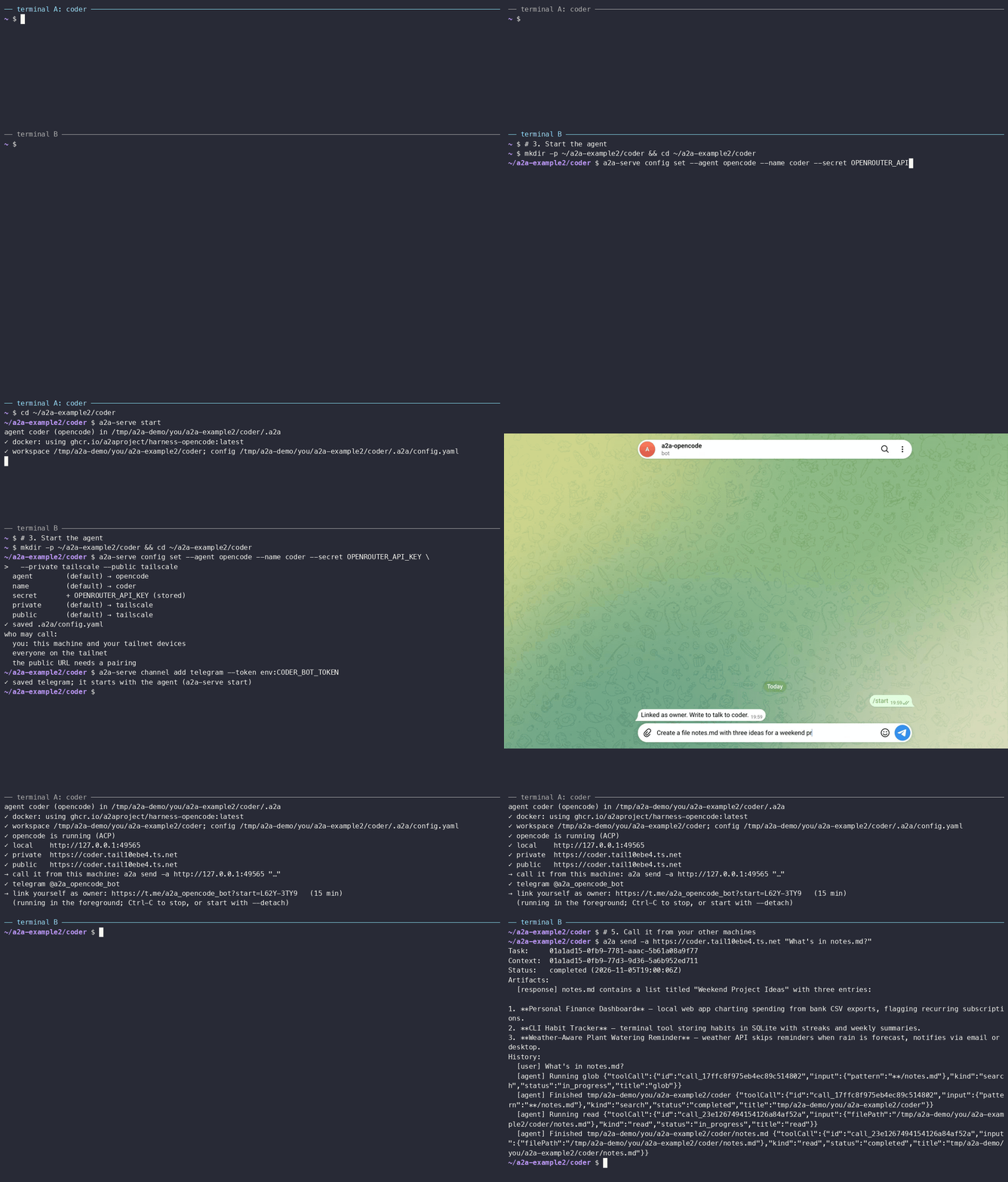
mkdir -p ~/a2a-example2/coder && cd ~/a2a-example2/coder
a2a-serve config set --agent opencode --name coder --secret OPENROUTER_API_KEY \
  --model openrouter/~google/gemini-flash-latest --private tailscale --public tailscale
a2a-serve channel add telegram --token env:CODER_BOT_TOKEN
a2a-serve start
config set --agent creates the agent without starting it, and
channel add connects the bot. env:CODER_BOT_TOKEN reads the token from
your shell now and stores it in .a2a/state/secrets, so later runs don't
need the variable.
On the first run, the agent asks to join your tailnet:
tailscale: open https://login.tailscale.com/a/... to add "coder" to your tailnet
Open the link and approve the machine. In the admin console, disable key
expiry for it, or the agent drops off the tailnet when the key expires. On
a headless machine, pass --tailscale-authkey env:TS_AUTHKEY to
config set.
Then it prints its URLs and the Telegram bot:
✓ local    http://127.0.0.1:46757
✓ private  https://coder.your-tailnet.ts.net
✓ public   https://coder.your-tailnet.ts.net
✓ telegram @coder_agent_bot
→ link yourself as owner: https://t.me/coder_agent_bot?start=K7Q29XF4   (15 min)
The private and public URLs are the same name: on the tailnet it is served directly, from the internet through Funnel.
4. Link Telegram
Open the t.me link on your phone and press Start. The bot replies:
Linked as owner. Write to talk to coder.
Now write to it like to any chat:
- Each chat is one conversation (an A2A context);
/newstarts a fresh one and/stopcancels the running task. - Answers stream in by editing one message.
- When the agent wants to run something, you get the request with buttons: allow once, always allow, or reject. Only you, the owner, can answer.
Try: Create a file notes.md with three ideas for a weekend project.
5. Call it from your other machines
Your devices on the tailnet are recognized by their Tailscale identity, so they need no pairing code:
a2a send -a https://coder.your-tailnet.ts.net "What's in notes.md?"
Other people on your tailnet can call it too. They see and approve only their
own tasks. a2a-serve status lists who can call, and
a2a-serve config set --private-access paired limits the tailnet to you and
your pairings.
Other people get a code from you, as in Serve a Coding Agent:
a2a-serve pair invite anna, and then they run a2a-serve pair join with it.
6. Add the Grok bot as a webhook node
A webhook node is an agent that only runs when woken. The agent server gives
it an A2A address and holds its tasks; when a task arrives, it POSTs a signed
wake to the webhook. The bot answers later with the a2a CLI or plain HTTPS.
In the agent's directory, add the node. Header values can be env:VAR:
export GROK_WEBHOOK_TOKEN=<token your Grok webhook expects>
a2a-serve pair invite grok \
  --webhook <your Grok bot's webhook URL> \
  --webhook-header "Authorization: Bearer env:GROK_WEBHOOK_TOKEN" \
  --description "Grok: web search and current events"
→ webhook node grok; the agent calls it as "grok"
  send this to the agent behind the webhook (the code works once, for 15 min):

    You are the webhook node "grok" of the agent at https://coder.your-tailnet.ts.net.
    Read https://coder.your-tailnet.ts.net/mailbox/skill.md and follow it.
    Your pairing code is 8HD2-PQ7M.

  you can call it yourself at https://coder.your-tailnet.ts.net/n/grok
The message uses the public URL, because Grok calls the agent from the internet.
7. Set up the Grok side
Paste the message from step 6 into your Grok bot's instructions. The skill it
points to has everything the bot needs: how to download a2a-serve and the
a2a CLI from the agent, pair with the code, read a wake, and reply. You don't
run any pairing command yourself. The downloads are the server's own binaries,
so they run for the bot when the server runs on Linux; otherwise the bot needs
Linux builds, or it can use the plain HTTPS API at the end of the skill.
On its first run, the bot pairs with a2a-serve pair join and gets a node token.
Store that token where the bot keeps secrets, as A2A_NODE_TOKEN: it
includes the agent's URL, so it is the only setting the bot needs on later
wakes. Each wake is a JSON body with kind, taskId, text and
instructions, signed with X-A2A-Serve-Signature, and the bot answers with:
a2a-serve mailbox reply <taskId> --final "Here is what I found: ..."
The same token lets the bot call your agent, as an authenticated caller, for example from a scheduled routine:
a2a send -a https://coder.your-tailnet.ts.net "Summarize today's commits"
Check that the node is paired:
a2a-serve pair list
The grok row has the kind webhook. It says not paired until the bot
has redeemed its code. If the code expired, run a2a-serve pair invite grok
again for a new one.
8. Delegate to Grok from Telegram
In the Telegram chat:
Ask grok what the top AI news is today, and summarize it in three bullets.
The agent sees grok in the [a2a agents] line of its prompt and calls it
with a2a send, usually with --async because a webhook node answers
later. The server wakes the bot, the bot replies, and
the result is posted back into your chat as a new turn, where the agent
summarizes it. A node task with no reply for 10 minutes fails.
From a machine on your tailnet, you can also call the node directly as its owner:
a2a send -a https://coder.your-tailnet.ts.net/n/grok "What's new with Tailscale?"
9. Keep it running
Stop the foreground process with Ctrl-C, then install the agent as a user service (systemd on Linux, launchd on macOS):
a2a-serve start --service
a2a-serve status
a2a-serve logs -f
a2a-serve stop --uninstall removes the service again.
Troubleshooting
| Symptom | What to check |
|---|---|
HTTPS certificates are disabled in this tailnet |
Step 1: enable HTTPS on the DNS page. |
No public URL |
The funnel attribute in the tailnet policy (step 1). |
The URL is coder-1.your-tailnet.ts.net |
Another machine is named coder. Remove it in the admin console, and rename this one to coder. |
| The URL doesn't resolve | On the tailnet, the calling machine must run Tailscale with MagicDNS. From the internet, a new Funnel name can take several minutes to appear in public DNS; check with dig <name> @8.8.8.8. |
! tailscale: getting the certificate |
HTTPS certificates on the DNS page (step 1); the error says what Tailscale rejected. |
| The bot never answers | a2a-serve logs: a wake that failed shows the webhook's status, such as webhook returned 401 for a wrong token. a2a-serve pair list shows whether the node is paired. |
| The node lost its token | a2a-serve pair invite grok issues a new code; pairing replaces the old token. |
| Telegram is silent | Only one process can use a bot token; stop any other process using it. |
Next steps
The user guide covers Discord and email, who answers approvals, and contacts between agents on the same tailnet. The architecture shows how the pieces fit together.